
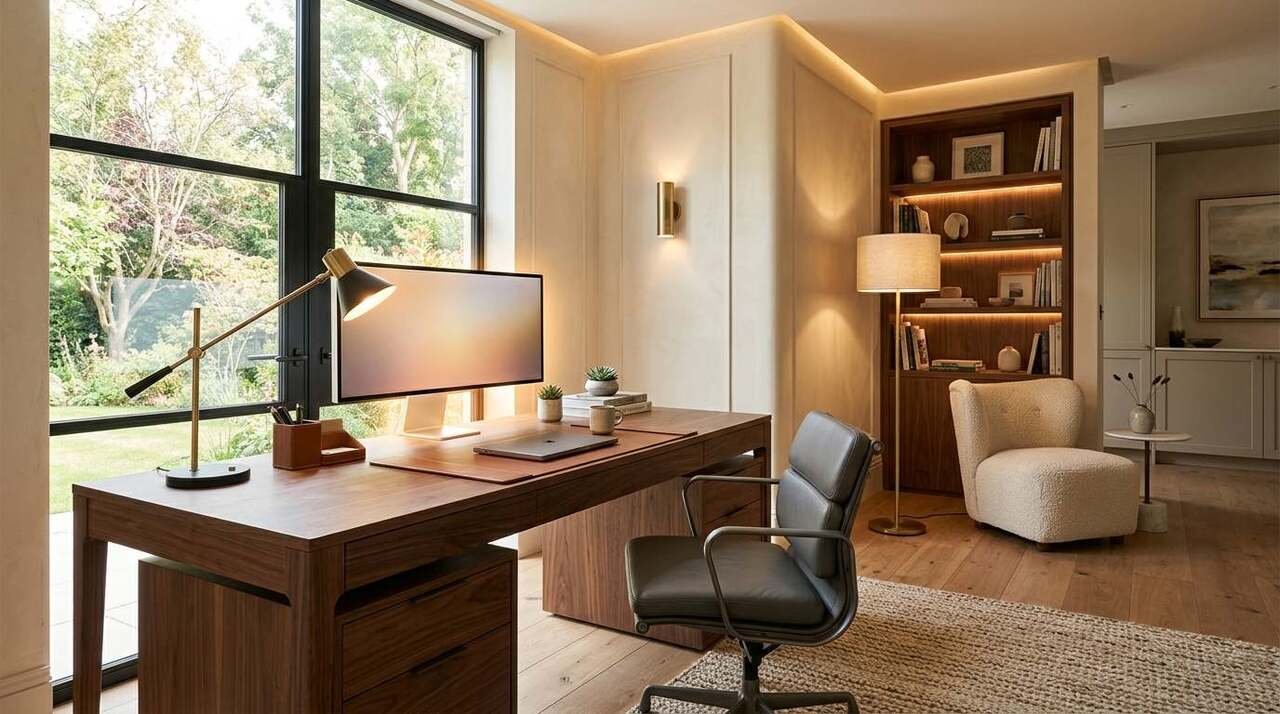

Poor lighting can make a beautifully designed home office uncomfortable within a few hours. Screen glare, dark corners, harsh overhead bulbs, and shadows across your desk can affect how easily you read, work, join video calls, and stay focused.
The best lighting ideas for home offices combine three layers: ambient lighting for the room, task lighting for focused work, and accent lighting to create a comfortable atmosphere. The goal is simple: light your workspace evenly while giving you enough control to adjust brightness throughout the day.
A home office doesn’t need to look like a corporate cubicle. A well-placed desk lamp, adjustable LED light, floor lamp, or wall sconce can make the space feel warmer while still giving you practical illumination where you need it.
Table of Contents
Quick Answer: What Is the Best Lighting Setup for a Home Office?
The best home office lighting setup usually combines natural daylight, general room lighting, and an adjustable task light. Place your desk to reduce direct screen glare, use a desk lamp with adjustable brightness and color temperature, and add softer secondary lighting to reduce harsh contrast between your monitor and the surrounding room.
| Lighting Layer | Main Purpose | Best Placement |
|---|---|---|
| Natural light | Daytime illumination | Beside or near the desk |
| Ambient light | General room brightness | Ceiling or floor lighting |
| Task light | Focused desk work | Beside or above the workspace |
| Monitor bias light | Reduces harsh screen contrast | Behind the monitor |
| Accent light | Adds warmth and visual interest | Shelves, walls, or corners |
A layered setup gives you more control than relying on a single ceiling fixture.
1. Place Your Desk Near Natural Light
Natural light is often the best starting point for a comfortable workspace. A window can brighten the room during the day and reduce your dependence on artificial lighting.
The placement matters.
A desk positioned directly in front of a window may create glare on your monitor. Sitting with a bright window directly behind you can also make video calls difficult because your face may appear dark against the bright background.
In most home offices, placing the desk perpendicular to the window works well. Light reaches the workspace from the side while reducing direct reflections on the screen.
A simple desk placement guide
| Desk Position | Potential Result |
| Facing the window | Possible monitor glare |
| Back to the window | Strong backlighting on video calls |
| Perpendicular to the window | Often the most balanced option |
| Far from the window | May require more artificial lighting |
Sheer curtains or adjustable blinds can also help control strong sunlight.
2. Use a Dedicated Adjustable Desk Lamp
A desk lamp remains one of the most useful additions to a home office because it puts light exactly where you need it.
Look for features such as:
- Adjustable brightness
- Adjustable color temperature
- A movable arm or flexible neck
- A wide, even beam of light
- Low-glare illumination
An adjustable lamp works particularly well if your home office serves several purposes. You might need bright, cooler light while reviewing documents during the day and softer, warmer light when answering emails later in the evening.
Amazon-friendly recommendation
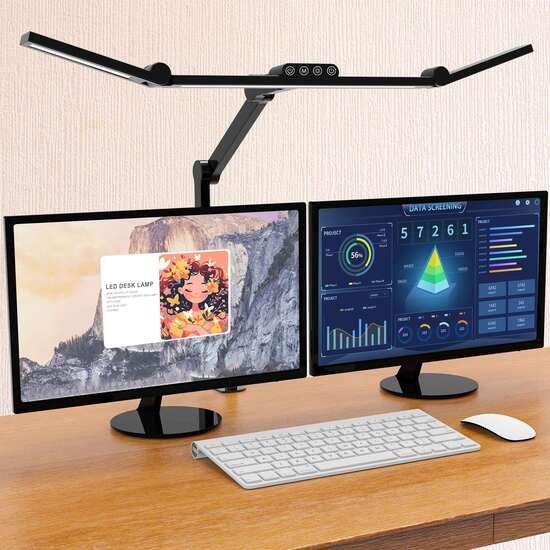
A dimmable LED desk lamp with adjustable color temperature can be a practical choice for most desks.
Who it’s for: People who read, write, work on multiple screens, or want different lighting settings throughout the day.
Who should skip it: Anyone with a very small desk may prefer a wall-mounted or monitor-mounted light.
Pros:
- Adjustable to different tasks
- Uses relatively little energy
- Can reduce the need for multiple lamps
Cons:
- Some models take up valuable desk space
- Very cheap LEDs may produce uneven or unpleasant light
[Check Current Price on Amazon]
3. Add Layered Ambient Lighting
One overhead light can leave parts of a room looking flat or uneven.
Layered lighting spreads illumination across different parts of the office. You might combine a ceiling fixture with a floor lamp and a desk lamp.
This approach can be especially useful in larger rooms or offices with dark walls and furniture.
A floor lamp placed in an unused corner can brighten the room without crowding your desk. Indirect lighting aimed toward a wall or ceiling can also create a softer effect than a bare overhead bulb.
A practical three-light setup
For a typical home office, try:
- One general ceiling light.
- One adjustable desk light.
- One secondary floor lamp or wall light.
This gives you separate controls for working, reading, video calls, and evening use.
4. Choose the Right Color Temperature
Color temperature changes how a room feels and how clearly certain tasks appear.
Light is commonly described using Kelvin values.
| Color Temperature | Appearance | Best Use |
| 2700K–3000K | Warm | Relaxed evening work |
| 3500K–4000K | Neutral | General office work |
| 5000K–6500K | Cool/daylight | Detailed visual tasks |
For many home offices, around 4000K offers a balanced starting point.
A lamp with adjustable color temperature gives you more flexibility. You can use a brighter neutral setting during concentrated work and switch to warmer light later in the day.
5. Reduce Monitor Glare With Indirect Lighting
A bright lamp pointed directly at your monitor can create reflections and distracting glare.
Instead, position lights so they illuminate the desk and surrounding area without shining directly into the screen.
Pay attention to reflective surfaces too. Glass desks, glossy furniture, framed artwork, and polished walls can bounce light in unexpected directions.
A few small adjustments can make a noticeable difference:
- Move the lamp to the side of the monitor.
- Angle the light away from the screen.
- Use a shade or diffuser.
- Adjust monitor tilt.
- Control direct sunlight with blinds or curtains.
6. Try a Monitor Light Bar
A monitor light bar sits above the screen and directs light toward your desk.
This can be a useful option when desk space is limited. Because the light is positioned above the monitor, it can illuminate your keyboard, notes, and work surface without requiring a traditional lamp base.
Who it’s for
Monitor light bars can work well for:
- Small home offices
- Compact desks
- Multi-monitor setups
- People who prefer a clean desktop
Who should skip it
You may prefer a conventional desk lamp if you frequently work with large physical documents or need to direct light toward different areas.
Pros:
- Saves desk space
- Provides focused workspace lighting
- Often includes dimming controls
Cons:
- Compatibility can vary between monitor designs
- Light coverage may be narrower than a desk lamp
[Check Current Price on Amazon]
7. Use Bias Lighting Behind Your Monitor
Bias lighting is a soft light placed behind a monitor or television.
In a home office, it can reduce the visual contrast between a bright screen and a dark wall. This can make the surrounding workspace feel more balanced, especially when working in the evening.
LED strips are commonly used for this purpose.
Choose a soft, diffused light rather than an extremely bright strip. The goal is to create gentle background illumination rather than turn the wall behind your monitor into the brightest part of the room.
Who it’s for: People who frequently work in darker rooms or use monitors in the evening.
Who should skip it: Bright rooms with strong ambient lighting may see less benefit.
[Check Current Price on Amazon]
8. Add a Floor Lamp to Dark Corners
A dark corner can make an entire room feel underlit even when the desk itself is bright.
A floor lamp is an easy way to distribute light more evenly.
For a softer look, choose a lamp with a shade that diffuses the bulb. For more flexibility, consider an adjustable reading lamp that can direct light upward, downward, or toward a wall.
Tall floor lamps can also help balance a home office visually when most furniture sits at desk height.
9. Use Wall Sconces to Free Up Desk Space
Wall sconces can provide useful secondary lighting without taking up desk or floor space.
They work especially well in small home offices where every square foot matters.
Adjustable swing-arm sconces can also function as task lighting near a desk. Fixed sconces are better suited for ambient illumination.
Before installing hardwired fixtures, consider whether plug-in sconces would provide enough flexibility for your space.
10. Light Your Background for Better Video Calls
Video calls look better when your face and background have balanced lighting.
A bright light behind your chair can make your face appear darker. A light source positioned in front of you or slightly to the side usually produces a more balanced result.
You don’t necessarily need a large studio setup.
A simple arrangement may include:
- Soft light near the front of your desk
- Moderate ambient light in the room
- A small lamp or accent light behind you
Avoid placing an extremely bright bulb directly in your line of sight.
A small dimmable LED video light can be useful if you regularly attend meetings, record presentations, or create content from your home office.
11. Install Smart Bulbs for Flexible Control
Smart bulbs can make it easier to adjust brightness and color temperature throughout the day.
They can be particularly useful if your office contains several lamps. Instead of walking around the room to adjust each one, you can control compatible bulbs individually or as a group.
A simple routine could include:
- Brighter neutral lighting during morning work
- Moderate brightness in the afternoon
- Warm, softer lighting during evening tasks
Smart lighting is most useful when it solves a real inconvenience. A standard dimmable bulb may be enough for a simple one-lamp setup.
12. Use Dimmers for Better Light Control
A dimmer gives you more flexibility than a standard on-and-off switch.
The same room may need different brightness levels depending on the time of day, weather, task, and amount of natural light entering through the windows.
Dimmable lighting can help you avoid the common problem of having a room that feels either too dark or excessively bright.
Check compatibility before pairing dimmer switches with LED bulbs, since not every bulb works properly with every dimmer.
13. Consider Under-Shelf and Cabinet Lighting
Built-in shelves above or beside a desk can create shadows over your workspace.
Under-shelf LED lighting can solve that problem while also adding a polished look to the office.
This idea works particularly well for:
- Built-in desks
- Floating shelves
- Wall-mounted storage
- Small alcove offices
Choose a diffuser when possible so individual LED points don’t create harsh reflections on glossy surfaces.
14. Match Lighting to Your Interior Style
Home office lighting should work with the rest of the room.
A minimalist office may suit a slim metal floor lamp or simple architectural desk light. A warmer, more traditional room may look better with fabric shades, brass finishes, or a table lamp with a sculptural base.
For a more luxurious look, mix practical work lighting with one decorative fixture.
For example:
- A functional LED desk lamp for daily work
- A statement pendant or chandelier for the room
- A small table lamp for warmth
The decorative fixture creates personality while the task light handles the practical work.
15. Create Separate Lighting Zones in a Multi-Purpose Room
Many people work from bedrooms, living rooms, guest rooms, or open-plan spaces.
Separate lighting zones can help define the office area without building a wall.
Use one group of lights for the workspace and another for the rest of the room. A desk lamp, wall sconce, or floor lamp can visually mark the work zone.
This can also make it easier to change the mood of the room after the workday ends.
How Much Light Does a Home Office Need?
A home office needs enough light for comfortable reading, screen work, writing, and other tasks without creating excessive glare.
The ideal amount depends on the size of the room, wall colors, window placement, and type of work you do.
Detailed tasks generally benefit from stronger, more focused illumination than casual computer work. Dark walls and dark furniture may also absorb more light, requiring additional fixtures.
A useful approach is to start with moderate general lighting and then add focused task lighting where shadows appear.
Common Home Office Lighting Mistakes
Using Only an Overhead Light
Ceiling lighting may leave shadows across your desk or create uneven illumination.
Add a dedicated task light for closer work.
Putting a Bright Lamp Directly Behind the Monitor
This can create reflections or excessive contrast.
Move the lamp to the side or use indirect lighting.
Choosing a Bulb That’s Too Cool for Evening Work
Very cool lighting may feel harsh late at night.
Adjustable bulbs or warmer secondary lamps give you more control.
Ignoring Window Placement
Natural light can be helpful or distracting depending on where the desk sits.
Test your desk at different times of day before deciding on a permanent arrangement.
Using Too Many Decorative Lights
A room can look attractive while still having poor task lighting.
Make sure your primary work surface receives sufficient, controlled illumination first.
A Simple Home Office Lighting Formula
If you’re starting from scratch, this setup is a practical place to begin:
| Area | Lighting Recommendation |
| Desk | Adjustable LED task lamp |
| Monitor area | Optional monitor light bar or bias light |
| General room | Ceiling fixture or floor lamp |
| Video calls | Soft front-facing light |
| Shelves | Optional under-shelf lighting |
| Evening work | Warm secondary lamp |
You can expand the setup gradually rather than buying everything at once.
Start with the light that solves your biggest problem. If your desk is too dark, begin with a task lamp. If the entire room feels gloomy, add ambient lighting. If your screen feels uncomfortable at night, experiment with indirect lighting behind the monitor.
Key Takeaways
- The best lighting ideas for home offices use a combination of ambient, task, and accent lighting.
- Position desks perpendicular to windows when possible to reduce screen glare.
- An adjustable LED desk lamp gives you flexible lighting for different tasks.
- Neutral light around 3500K–4000K is a practical starting point for general office work.
- Monitor light bars can save valuable desk space.
- Bias lighting behind a monitor can create a more balanced evening workspace.
- Floor lamps and wall sconces help distribute light throughout the room.
- Separate lighting zones can make a multi-purpose room easier to use.
- Start by fixing your biggest lighting problem before adding decorative fixtures.
A well-lit home office should feel comfortable at 9 a.m., practical during focused work, and pleasant when you’re finishing a few tasks later in the evening. Build the room in layers, give yourself control over brightness, and place each light where it solves a specific problem.
Frequently Asked Questions
What is the best type of lighting for a home office?
The best setup combines ambient lighting, focused task lighting, and natural daylight when available. An adjustable LED desk lamp paired with general room lighting works well for many home offices.
Should I use warm or cool light in a home office?
Neutral light around 3500K to 4000K is often comfortable for general work. Adjustable bulbs give you the flexibility to use warmer light later in the day.
Where should I place my desk lamp?
Place the lamp so it illuminates your work surface without creating shadows or monitor glare. The ideal side can depend on your writing hand and desk arrangement.
Are LED lights good for home offices?
Yes. LEDs are widely used because they are energy-efficient, available in different brightness levels, and often offer dimming and adjustable color temperature.
Is a monitor light bar worth it?
A monitor light bar can be useful for small desks and screen-based work because it provides focused desk illumination without occupying much workspace.
How can I reduce glare on my computer screen?
Position your monitor away from direct sunlight, avoid placing bright lights directly behind or in front of the screen, and use curtains or blinds to control strong daylight.
What lighting is best for video calls?
Soft light positioned in front of you or slightly to one side generally works well. Add moderate background lighting so your face and surroundings appear balanced.
How many lights should a home office have?
A typical setup can include two or three light sources: one ambient light, one task light, and an optional accent or bias light.


Leave a Reply